
When support tickets pile up, customer service operations feel the strain. Every day, teams face a constant flow of “Where is my order?” inquiries, return requests, refund demands, and urgent shipping address changes. Handling this repetitive workload manually drags down margins and burns out support agents. Yet, rushing to automate carries a major risk: losing customer trust through generic, circular chat loops that fail to resolve the actual issue.
AI agents for e-commerce customer support are most useful when they work inside clear policies, order data, validation rules, and human escalation paths.
Autonomous AI agents offer a practical way to manage this load. However, they are not magic plug-and-play solutions. An AI agent can only successfully resolve inquiries when it is connected to a store’s Standard Operating Procedures (SOPs), store policies, real-time product data, order databases, validation rules, and clear human escalation paths. At Pro Prompt Flow, we treat AI agents as workflow systems first and chat interfaces second. The chat window is only the surface; the real value comes from the SOPs, policies, data access, and escalation rules behind it.
This guide outlines how to build an integrated support system. We will explore how AI agents read and resolve inquiries, establish strict operational guardrails, and implement human-in-the-loop safety nets to keep your customer trust intact.
1. Chatbots vs. AI Agents: The Real Difference in E-commerce Support
Rule-Based Deflection: Why Traditional Chatbots Frustrate Customers
Traditional chatbots are built on rigid decision trees or basic keyword-matching rules. When a customer asks a question, the bot scans for specific words and matches them to a pre-written response. If the inquiry deviates even slightly, the chatbot fails, leading to repetitive loops and frustrated customers. These systems are deflection-focused: their goal is to keep the customer away from human support rather than solving the problem.
Autonomous Action: How AI Agents Read, Reason, and Resolve
Autonomous AI agents use large language models to understand the context and intent behind customer inquiries. Instead of relying on static scripts, they analyze the message, query the necessary databases, apply your store’s business policies, and decide on the next logical step. Rather than merely deflecting tickets, they can complete authorized, low-risk actions through API integrations, while consequential changes to orders or customer records remain subject to scoped permissions and human approval gates.
Comparison Matrix: Chatbots vs. AI Agents
| Capability | Traditional Chatbots | Autonomous AI Agents |
|---|---|---|
| Core Technology | Keyword triggers and static decision trees. | Large language models with contextual reasoning. |
| Data Integration | None or basic static links. | Real-time API access to Shopify, ERPs, and carriers. |
| Resolution Ability | Restricted to sharing links or articles. | Can retrieve order and refund evidence, check eligibility, and prepare recommended actions. Refunds and other consequential order-state changes, including cancellations or material address changes, require explicit human or store-administrator approval before execution. |
| Context Retention | Lost immediately after a session resets. | Maintains multi-turn context throughout the conversation. |
2. Why E-commerce Support is the Perfect Sandbox for AI Agents
Structured Data: The Advantage of Standardized Order Formats
AI agents thrive in environments with structured, predictable data. E-commerce platforms organize information in clean, standardized formats. An order always contains a specific customer email, billing address, shipping destination, product SKU, and transaction status. This structural consistency makes it straightforward for an AI agent to query databases via API and fetch precise details without ambiguity.
Repeated Workflows: Identifying High-Volume Support Inquiries
Start by reviewing your own ticket history to identify recurring inquiry categories. Separate informational or read-only workflows—such as tracking lookups—from requests that can change an order, customer record, refund, or return state. Informational workflows may often be handled through retrieval and response steps, while consequential requests need explicit control points. For shipping-address changes, the agent may verify the requester, validate the proposed address, and prepare the change, but an authorized human must approve the final Shopify update before it is executed. Shopify’s ecommerce customer service guidance also reinforces the value of support tools that connect cleanly with store operations. This separation helps teams automate repetitive support work without blurring who is authorized to change store state.
3. How AI Agents for E-commerce Customer Support Handle Practical Workflows
Implementing AI agents successfully requires converting your written policies into actionable API-driven workflows. Below are three premium workflow architectures designed to automate resolutions safely:
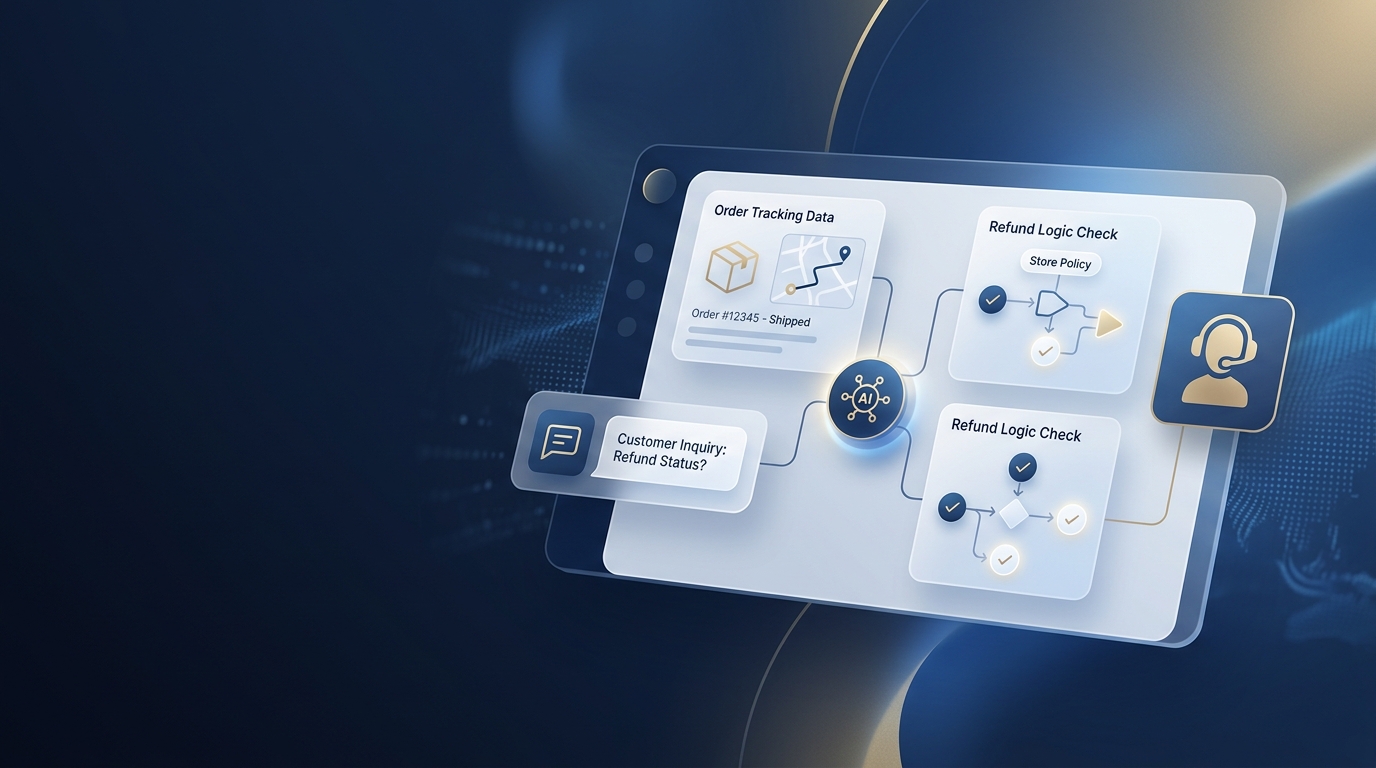
Workflow Box 1: WISMO Verification Pipeline (Where Is My Order?)
Trigger: Customer asks about order tracking or delivery status.
Data Needed: Order ID, Customer Email Address, Live Carrier API Tracking Data (e.g., ShipStation, UPS, FedEx).
Agent Action: Extracts the Order ID and email from the conversation, validates them against the store database, and queries the shipping carrier’s API to retrieve the current tracking history.
Validation Check: Compares the customer-provided email address with the email associated with the Order ID in the system database to verify identity.
Human Escalation Condition: The tracking status shows no carrier update for more than 5 days (indicating a lost package), or is marked as “delivered” but the customer claims they did not receive it.
Final Customer Response: “Hi Jordan, your order #10492 was shipped on June 3 via UPS. It is currently in transit in Chicago, IL, and is scheduled for delivery on June 8. You can track its progress here: [Tracking Link].”
Workflow Box 2: Refund Eligibility and Human Approval Gate
Trigger: Customer requests a refund for a damaged or unwanted item.
Data Needed: Order ID, Customer Email, Purchase Date, Refund Policy Window, Return Center Warehouse Receipt.
Agent Action: Retrieves the transaction date and warehouse return-receipt evidence, checks eligibility against the store’s documented policy, and prepares a recommendation for human review.
Validation Check: Checks that the item was returned within the documented policy window and records the eligibility result and supporting evidence for the human reviewer.
Human Review and Escalation Condition: A human or store administrator reviews and explicitly approves or declines every refund. Escalate exceptions, out-of-policy requests, and accounts flagged for multiple recent refund requests to the appropriate support supervisor.
Final Customer Response after human approval: “A store administrator has approved your $45.00 refund for order #10492. Once the payment system confirms processing, the funds should appear in your original payment method within 3 to 5 business days. Please let us know if we can help you with anything else.”
Workflow Box 3: Human Escalation Rule
Trigger: Customer expresses high frustration or has an issue that requires subjective human judgment.
Data Needed: Live Chat Transcript, Customer Account History, Sentiment Score.
Agent Action: Immediately pauses the AI agent’s responses, flags the ticket as high priority, and routes the conversation directly to the live human support queue.
Validation Check: Monitored continuously. Triggers automatically if sentiment analysis detects angry language, or if the customer types phrases like “human,” “person,” or “talk to someone.”
Human Escalation Condition: Instant escalation; no further automated actions are attempted.
Final Customer Response: “I understand your frustration. I am connecting you with one of our support leads right now. They will have access to our entire chat history, so you won’t have to repeat yourself. One moment, please.”
Realistic Support Scenarios
To understand how these workflows operate in practice, let us look at five common operational scenarios:
- Scenario 1: Wrong Shipping Address
Action: A customer realizes they typed the wrong address (“123 Main Stt”) right after checkout. The AI agent verifies the requester against the order using the store’s approved identity check and checks the order status. If the order is unfulfilled, the agent validates the proposed address through a shipping validation API and prepares the correction for human review. After an authorized human approves the correction, the final update is made in Shopify and an updated confirmation is sent to the customer. If the package has already shipped, the agent immediately escalates the ticket to a human manager to arrange a carrier redirect. - Scenario 2: Late Carrier Package
Action: A customer asks why their delivery is delayed. The AI agent checks the carrier API and finds a weather delay status. It explains the delay context to the customer calmly. If the tracking update is missing for more than 5 days, the agent flags the ticket for a human team member to open a tracer with the carrier. - Scenario 3: Sizing and Compatibility
Action: A customer asks if a pair of boots runs large. The AI agent queries the product database, pulls specific sizing recommendations from product metadata, and notes that customers should order a half-size down. If the customer asks a complex question about orthotic compatibility not covered in the fit guide, the agent escalates the ticket to a product specialist. For detailed insights on how product metadata helps resolve customer inquiries, read about crafting ChatGPT prompts for product descriptions. - Scenario 4: Wholesale / B2B Inquiry
Action: A customer asks for wholesale pricing on 500 units. The AI agent recognizes the bulk purchasing intent, requests the business name and tax ID, and forwards this pre-qualified lead to the wholesale sales team. The agent does not promise discounts directly. - Scenario 5: Post-Purchase Discount Request
Action: A customer complains they forgot to apply a discount code. The AI checks the store database to verify the order date and the code’s active status and rules, then prepares an eligibility recommendation. A human or store administrator decides whether to approve and execute any partial refund; out-of-policy requests are escalated to a support supervisor.
4. The Human-in-the-Loop (HITL) Safety Model
The Triage Layer: Classifying Ticket Urgency and Intent
Every incoming message must go through a triage layer before the AI agent takes action. The system classifies the message intent (e.g., billing, tracking, fit advice) and determines its urgency. Highly sensitive issues, such as chargeback threats, credit card updates, or legal claims, bypass the AI entirely and route directly to specialized human teams.
The Hand-Off Trigger: How to Transfer to Human Agents Smoothly
A hand-off must occur without friction. The AI agent hands over the ticket to a human along with a structured summary, detailing the customer’s intent, the data verified, and the trigger for escalation. This prevents the customer from having to repeat their issue from the beginning.
Keeping Customer Data Intact Across Transitions
During a transfer, the full conversation transcript and all verified metadata (such as the customer’s Shopify ID and shipping status) must remain attached to the ticket in your helpdesk software (e.g., Zendesk, Gorgias). Zendesk’s automated customer support guide also emphasizes keeping service teams involved as automation is implemented and improved. This ensures the human agent has immediate access to the necessary context.

5. Essential Guardrails to Prevent AI Support Hallucinations
API Limitation: Restricting Write-Access to Store Databases
AI agents should operate on the principle of least privilege and receive only the permissions necessary for their tasks. Consequential actions—such as processing refunds, changing product prices, cancelling orders, or materially changing customer or order state—must be routed through controls that require explicit human approval before execution.
Memory Restructuring: Clearing Context Windows to Avoid Loops
To prevent AI agents from getting caught in conversational loops, use structured context management. Irrelevant conversational history can be bounded or pruned when topics change, but verified customer identity and order information required for the active workflow should remain intact. If the system detects repetitive inputs or unresolved ambiguity, route the conversation through the existing human-escalation path rather than repeatedly resetting context.
Policy Pinning: Keeping Store Terms & Conditions Unalterable
Pinning store policies in system instructions helps keep responses aligned with approved rules, but prompt text is not an enforcement boundary. Use scoped API permissions and explicit approval gates to control what the agent can actually change. For consequential actions, the model may retrieve policy information and prepare a recommended action, while technical permissions and human authorization determine whether the change can be executed. Learn more about structuring system instructions by studying how to use AI prompts for e-commerce.
6. A 4-Step Roadmap to Safely Implementing AI Support Agents
If your support automation needs workflow mapping, policy guardrails, and handoff rules before implementation, review our workflow automation setup.
Step 1: Document Your Support SOPs
Before writing a single line of integration code, standard operating procedures must be clearly documented. If a human agent cannot resolve a ticket based on your current documentation, an AI agent will fail as well.
Step 2: Establish a Clean Knowledge Base
Organize your FAQs, product specifications, and return rules into a clean, searchable knowledge base. The AI agent uses semantic search to locate policies; clean data prevents it from providing incorrect advice.
Step 3: Run Shadow Testing
Run the AI agent in a sandbox environment. Have it drafts responses to real tickets, but route those drafts to your human support team for review instead of sending them to customers. This allows you to evaluate accuracy and adjust guardrails safely.
Step 4: Graduate to Live Support with Human Review
Move from shadow testing to live low-risk replies only after predefined acceptance criteria and must-pass safety checks are met and an authorized owner approves the release. Initial production scope should remain limited to approved low-risk replies, such as tracking-status or policy answers; this release does not grant consequential write permissions. Continue monitoring production behavior and escalation outcomes after release.
7. Metrics that Matter: Measuring AI Support ROI
Track autonomous resolution rate only for tickets completed entirely within the agent’s authorized scope. Report separately the tickets where the agent retrieved data or prepared an action but a human approved the consequential step. Monitor Customer Satisfaction (CSAT) for relevant interaction types, cost per ticket, and human handling time alongside these resolution metrics.
Conclusion: Your E-commerce Store is a System, Not Just a Blog
Automating customer resolutions is an engineering task, not just a copywriting exercise. By connecting AI agents to structured SOPs, real-time data, strict guardrails, and human escalation rules, e-commerce brands can manage rising ticket volumes while protecting customer trust. Integrating these support agents with broader systems, like using AI prompts for e-commerce marketing for post-purchase flows, helps turn your customer support channel into a source of customer loyalty.
Take Control of Your Store Workflows
Are you ready to automate your support queue safely? We can help you map out your automation workflows and build clean integration pipelines.
- Audit: Book a Free AI Workflow Audit to identify bottlenecks in your current helpdesk.
- Starter Pack: Download the E-commerce AI Workflow & Prompt System Starter for system prompt structures and operational blueprints.
Frequently Asked Questions
Q: How do AI agents differ from traditional chatbots in e-commerce customer support?
A: Autonomous AI agents can use conversational context, live store data, and standard operating procedures to retrieve information and complete specifically authorized low-risk actions, such as tracking lookups or standard policy answers. For shipping-address corrections or returns, the agent may verify details, check eligibility, and prepare the proposed action, but the final order update, RMA authorization, and prepaid return-label issuance remain human-gated. Traditional rule-based chatbots are typically more constrained by predefined triggers and decision paths.
Q: What kind of data do AI agents need to resolve customer issues?
A: AI agents require read access to your e-commerce platform APIs (to verify customer order details), return management software, shipping carrier tracking feeds, and your internal product knowledge base.
Q: How do you prevent an AI agent from issuing unauthorized refunds?
A: You implement strict API permissions that prevent the agent from executing refunds. The agent may retrieve order and return evidence, check eligibility against documented policy, and prepare a recommendation. A human team member or store administrator must review and explicitly approve the final refund action.
Q: When should an AI agent escalate a conversation to a human?
A: The agent should escalate whenever the requested action requires human authorization, when policy application is ambiguous or subjective, when customer sentiment indicates human intervention is appropriate, or when the customer explicitly asks to speak with a person.
Q: Can AI agents handle complex product questions?
A: Yes, if your product database and fit guides are well-structured. The agent uses this data to answer sizing or compatibility questions, and escalates to a human product expert if the answer is not documented in the reference files.
Pingback: AI Workflows for E-commerce: 7 Automations for Small Stores