
When a small or lean business team decides to introduce artificial intelligence, the first questions are often technical: Which model should we use? Which automation platform should we configure? Which prompt should we start with?
That sequence can overlook a more basic operational problem. If the underlying process is undefined, inconsistent, or undocumented, adding AI can magnify existing inefficiencies and produce unpredictable results.
Business process mapping for AI automation starts before tool selection. The team must discover, document, and validate the process that people actually perform, not the process everyone assumes exists. This guide provides a practical current-state mapping method for lean teams that need operational clarity before they design an AI workflow.
Table of Contents
- What Current-State Process Mapping Means
- Step 1: Choose One Process and Define Its Boundary
- Step 2: Discover How the Work Actually Happens
- Step 3: Map Decisions, Handoffs, Wait States, and Exceptions
- Step 4: Record Human Judgment and Existing Checks
- Step 5: Validate the Current-State Map
- Business Process Mapping Template for AI Automation
- Current-State Map Completeness Check
- Frequently Asked Questions
- References
What Current-State Process Mapping Means
Current-state mapping, often called as-is process mapping, documents how work runs today, including manual workarounds, informal decisions, repeated delays, and gaps between official procedures and daily execution.
For lean teams, the written procedure and the actual workflow can diverge over time as people adapt to changing systems, customer requirements, staffing constraints, and incomplete information. A useful map must therefore capture operational reality rather than an idealized version of the process.
Current-state mapping is not the stage for designing a better workflow or deciding where AI should operate. Its purpose is to establish what currently happens:
- where information enters the process
- who handles the work at each stage
- which inputs and systems they use
- what decisions they make
- where responsibility changes hands
- where work pauses, waits, or fails
- what evidence is retained
A reliable current-state map creates the factual baseline required for later workflow design. For the execution controls that come after mapping, see What Is a Controlled AI Workflow?
Step 1: Choose One Process and Define Its Boundary
Start with one repeated process. If the scope is too broad, the mapping exercise will absorb multiple workflows, roles, systems, and outcomes, making the result difficult to validate.
Define four structural components before documenting individual steps:
- Start Trigger: The objective event that initiates the process, such as a client email, form submission, support ticket, or scheduled review.
- Process Owner: The accountable role responsible for the process’s performance and maintenance.
- Systems of Record: The authoritative repositories where specific data domains are officially maintained.
- End Condition: The recorded state that proves the mapped process has completed.
A process may also contain temporary hold or wait statuses. These pause the work but do not satisfy the end condition.
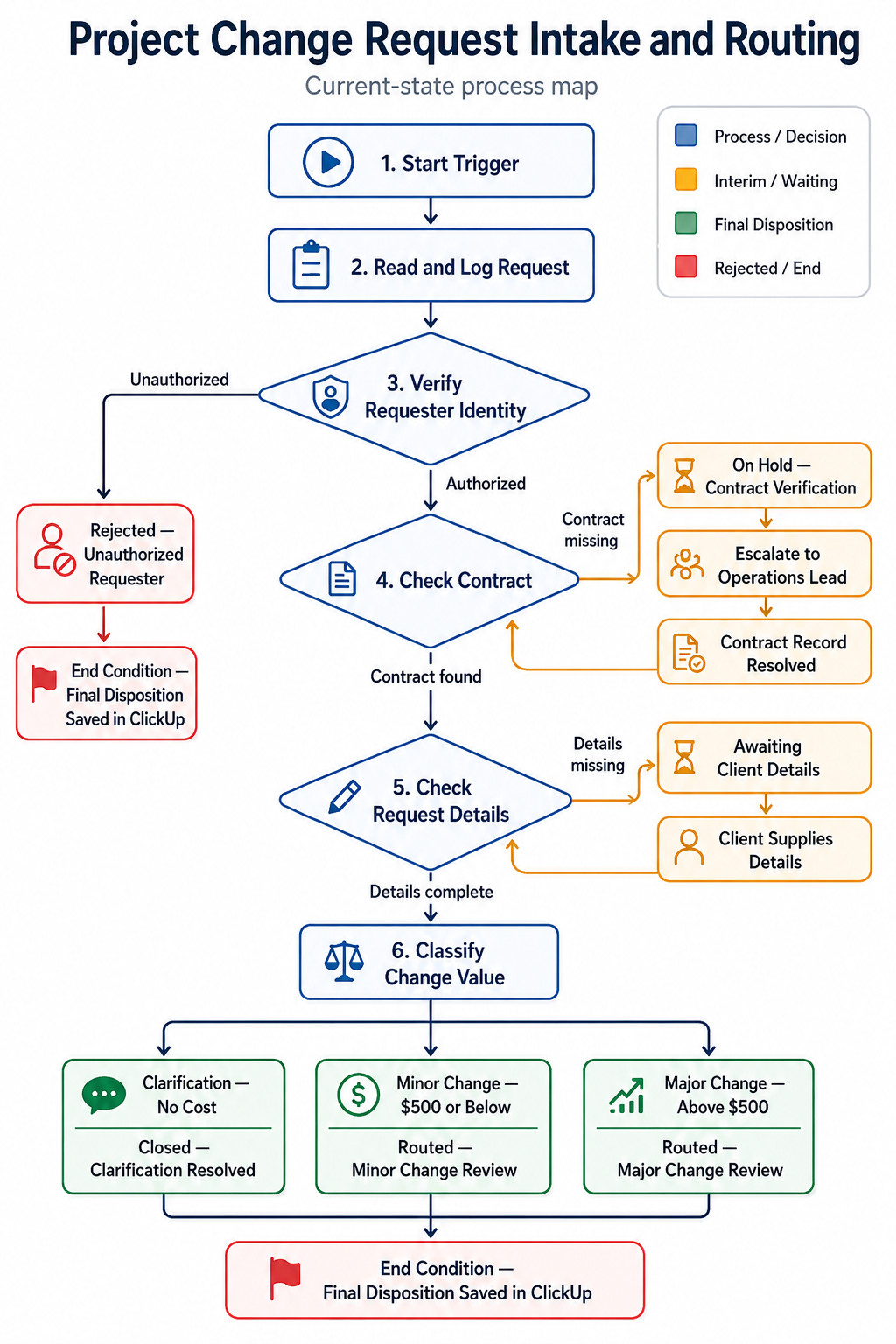
Worked Example: Project Change Request Intake and Routing
The fictional example used throughout this guide is Project Change Request Intake and Routing.
- Process Purpose: Receive, verify, categorize, and route incoming client scope-change requests.
- Start Trigger: A client submits a change request through email or a comment in the project-management system.
- Process Owner: Project Operations Lead.
- Systems of Record by Domain: Google Drive for signed contract documents, approved contact records, and the authoritative fee schedule; ClickUp for the official intake status and routing record.
- Interim Statuses:
Awaiting Client DetailsandOn Hold — Contract Verification. - Final Dispositions:
Rejected — Unauthorized Requester,Closed — Clarification Resolved,Routed — Minor Change Review, orRouted — Major Change Review.
The process ends only when ClickUp contains one of the four final dispositions. An interim status pauses the process and must later return to an active verification or classification step.
Step 2: Discover How the Work Actually Happens
A common discovery error is relying only on manager interviews or outdated documentation. The people executing the work often use additional checks, spreadsheets, messages, and informal approval routes that are absent from the official procedure.
A longstanding U.S. General Accounting Office guide recommends modeling current activities, roles, information flows, links, and dependencies before redesigning a process [1].
For lean teams, the Historical Walkthrough reduces discovery to four practical actions using recent completed cases:
Select Real Past Cases
Choose 5 to 10 completed cases from the previous three months. Include straightforward, complex, delayed, and exception-heavy examples.
Trace the Artifacts
Follow each case from its trigger to its final disposition. Identify every email thread, comment, spreadsheet, file version, status change, and approval record used along the way.
Interview the Doers
Speak with the people who handled those exact cases. Ask:
- What did you do next?
- Where did you obtain the required information?
- How did you decide which path to follow?
- What did you do when information was missing?
- How did you know the step was complete or approved?
Document the Gaps
Record where employees stepped outside the standard system, relied on memory, searched personal files, repeated data entry, or used an unofficial workaround because the central record was incomplete.
These gaps are not details to hide. They are part of the current process and must remain visible in the map.
Step 3: Map Decisions, Handoffs, Wait States, and Exceptions
A real process is rarely a straight sequence of tasks. It contains branches, role changes, delays, legitimate variants, and exception paths. These points can become failure points when they remain implicit.
On a small screen, tap the diagram to open the full-size version.
Standard Path
The standard path is the default route when the input is complete and no exception occurs. In the worked example, an approved client submits a clear minor change request, the Coordinator verifies the contract, classifies the request, and routes it to the designated Minor Change Review queue.
Decision Points
Document each point where a role evaluates information and selects a path. Record the criteria used. If the current criterion is subjective, such as “based on experience,” preserve that wording and flag it as a variable or known unknown rather than silently converting it into a formal rule.
Handoffs and Wait States
A handoff occurs when responsibility shifts to another role or queue. A wait state occurs when the process pauses for information, verification, or an external response.
The GAO guide identifies excessive handoffs, reviews, rework, and queuing time as process problems that detailed current-state modeling should expose [1].
In the example, missing request details create the interim status Awaiting Client Details. When the client supplies the information, the request returns to the completeness check. A missing contract creates On Hold — Contract Verification, which returns to contract verification after the Operations Lead resolves the record.
Legitimate Variants and Exceptions
Legitimate variants are expected alternative paths:
- Clarification — No Cost: Resolved directly by the Coordinator and closed as
Closed — Clarification Resolved. - Minor Change — $500 or Below: Routed to the designated Minor Change Review queue as
Routed — Minor Change Review. - Major Change — Above $500: Assigned to the Project Manager as
Routed — Major Change Review.
Exceptions prevent the process from continuing normally:
- Unauthorized Requester: The submitted identity is absent from the approved contact record. The Coordinator logs
Rejected — Unauthorized Requester. - Missing Contract: The authoritative contract record is unavailable. The request enters
On Hold — Contract Verification, escalates to the Process Owner, and returns to contract verification after resolution.
Step 4: Record Human Judgment and Existing Checks
This is where the map records who may decide, who may only route, and what proof the team keeps.
Human Judgment and Restricted Actions
Identify the steps where people interpret information, make a risk-sensitive judgment, or operate within an authority limit. Record what currently happens without designing a future control.
In the fictional intake-and-routing process:
- Project Coordinator: Interprets the request, compares it with the contract and fee schedule, classifies it, and records the routing disposition.
- Major Change Boundary: For requests above $500, the Coordinator records
Routed — Major Change Reviewand assigns the ClickUp ticket to the Project Manager. - Scope Boundary: The intake-and-routing process ends when the final disposition is stored. Pricing approval, commercial review, contract amendment, and implementation belong to a separate downstream process.
Quality Checks and Retained Evidence
Document the quality checks that currently occur during the process, including who performs each check and what criteria they use.
For each mapped check, record:
- Existing Quality Check: What does the team currently verify before the work proceeds?
- Evidence Currently Retained: What record, message, status update, or document shows that the check occurred?
In the fictional example, the Coordinator compares the exact sender email or ID with the approved contact record. The ClickUp entry records the verification result, timestamp, Coordinator role, and relevant Drive link.
Where no reliable check or evidence currently exists, record that absence as a pain point or known unknown. Do not invent a future control while documenting the current-state process.
Pain Points, Frequency, Variation, and Known Unknowns
- Pain Points: Record bottlenecks, repeated searches, duplicate entry, rework, unclear ownership, and conflicting records.
- Frequency and Variation: Record how often the process runs and how much the input format, volume, complexity, or route changes between cases.
- Known Unknowns: Record unresolved policy or data questions that prevent the team from describing the process confidently.
Step 5: Validate the Current-State Map
A process map remains provisional until the people involved in the work test it against real cases. The GAO guide treats validation by operational participants and the process owner as a key process-analysis check [1].
Use a Validation Walkthrough to test the draft map with the people who perform, receive, and own the work:
- Gather the Execution Team: Include the roles that perform, receive, review, or own the mapped work.
- Run a Desktop Simulation: Replay the historical cases through the draft map from trigger to final disposition.
- Identify Mismatches: Ask where the map differs from what happened, which handoffs are missing, and which approvals or workarounds remain undocumented.
- Refine the Map: Correct the map and retain unresolved disagreements as known unknowns rather than forcing artificial consensus.
The goal is not unanimous preference. It is a reliable account of how the work currently operates.
Business Process Mapping Template for AI Automation
Use this template in two passes: complete the 9 process-level elements once, then map the 12 step/path-level elements across the workflow. Together they form the 21-element method.
Process identification metadata (helper, not counted): Process Name — the specific workflow. Example: Project Change Request Intake and Routing.
Part 1: Process-Level Elements (Complete Once)
- Purpose
What to record: why the process exists and what value it delivers.
Example: Receive, verify, categorize, and route client scope-change requests. - Start Trigger
What to record: the objective event that initiates the work.
Example: A client email or project-management comment requests a scope change. - End Condition
What to record: the state that proves completion.
Example: ClickUp contains one of the four final dispositions; interim statuses do not complete the process. - Process Owner
What to record: the role accountable for process performance.
Example: Project Operations Lead. - Participants & Roles
What to record: everyone who performs, receives, or owns part of the work.
Example: Client, Project Coordinator, Project Manager, and Project Operations Lead. - Systems of Record
What to record: the authoritative repository for each data domain.
Example: Google Drive for contracts, approved contacts, and the fee schedule; ClickUp for intake status and routing. - Pain Points
What to record: bottlenecks, rework, and data-authority gaps.
Example: Searching multiple channels to confirm current contract scope. - Frequency & Variation
What to record: how often the process runs and how cases differ.
Example: 12 to 15 requests per month with high variation in complexity. - Known Unknowns
What to record: unresolved questions that prevent confident mapping.
Example: Contract-version rules for legacy clients signed before 2025.
Part 2: Step/Path-Level Elements (Map Across the Workflow)
- Required Inputs — the information or material needed across the workflow.
- Input Sources — where those inputs originate.
- Current Steps — the sequence of work people actually perform.
- Decision Points — the questions or criteria that select a path.
- Handoffs — where responsibility changes role or queue.
- Wait States — what pauses the process and where work resumes.
- Standard Path — the normal route from the start trigger to a recorded end condition.
- Legitimate Variants — expected alternative routes.
- Exceptions — conditions that prevent the standard path from continuing.
- Restricted Actions — actions a role may not take.
- Quality Checks — what is verified before work proceeds.
- Evidence Retained — the record proving what happened.
Helper fields — not counted among the 21: Process Name, Actor, Action, Path Type, per-step System of Record, and Human Judgment may be retained wherever they make the map easier to use. Process Name identifies the workflow. Actor, Action, per-step System of Record, and Human Judgment add useful detail to each worked-example entry, while Path Type is a navigation label. Per-step System of Record points back to the counted process-level Systems of Record element.
How to Use the Template
- Record Process Name as identification metadata, then complete the 9 process-level elements once to define the boundary and shared operating context.
- Trace the Standard Path from the Start Trigger to a recorded End Condition and list the Current Steps in the order people actually perform them.
- Map the remaining step/path-level elements wherever each input, source, decision point, handoff, wait state, variant, exception, restriction, check, or evidence record occurs.
- Retain helper fields where they improve clarity without adding them to the 21-element count.
- Validate the completed record against recent cases with the people who perform and own the work.
Worked Example: Execution Ledger
The filled example below keeps every substantive control, but omits fields that have no event at a given step. When a blank could be mistaken for missing research, record None explicitly in your working template.
Standard Path Summary
Client submits request → Coordinator logs it → Coordinator verifies requester and contract → Coordinator checks completeness → Coordinator classifies the request → Coordinator records and routes the final disposition.
Step 1.0 — Request Receipt and Initial Logging
- Actor: Project Coordinator
- Action: Read the incoming request and create the initial ClickUp ticket.
- Required Input: Client name, project ID, and change-request text.
- Input Source: Client email inbox or project-management-system comment.
- System of Record: ClickUp for the intake-status log.
- Path Type: Standard path.
- Legitimate Variant: Email intake or project-management comment.
- Human Judgment: Determine whether the text represents a scope-change request or a general inquiry.
- Quality Check: Confirm the project ID matches the active-project list.
- Evidence Retained: Initial ClickUp ticket creation log and timestamp.
Step 2.0 — Requester and Contract Verification
- Actor: Project Coordinator
- Action: Verify the requester and locate the active contract.
- Required Input: Sender email or ID and project ID.
- Input Source: Intake message for sender identity; Google Drive for approved-contact and contract records.
- System of Record: Google Drive for approved contacts and contract records; ClickUp for verification, hold, rejection, and routing statuses.
- Path Type: Standard path or exception path.
- Decision: Is the requester approved, and is the active contract available?
- Handoff: Missing contract escalates to the Project Operations Lead.
- Wait State: Missing contract creates
On Hold — Contract Verificationuntil the record is resolved, after which verification resumes. - Exception: Unauthorized requester or missing contract.
- Human Judgment: Assess the submitted identity against the approved-contact record.
- Quality Check: Match the exact sender identity; a domain match alone is not sufficient.
- Evidence Retained: ClickUp verification result, Drive contact or contract link, hold and escalation record where applicable, or final rejection record.
Step 3.0 — Request Detail and Completeness Check
- Actor: Project Coordinator
- Action: Compare the requested change with the active contract scope.
- Required Input: Request description and active contract PDF.
- Input Source: ClickUp ticket and Google Drive contract PDF.
- System of Record: Google Drive for authoritative contract scope; ClickUp for clarification status, scope-comparison notes, and retained communication evidence.
- Path Type: Standard path or wait-state path.
- Decision: Are the details complete enough to evaluate the request?
- Wait State: Missing details create
Awaiting Client Details; the process resumes at this step when the client responds. - Human Judgment: Interpret the request against the contract scope.
- Quality Check: Confirm that required deliverable and timeline details are present.
- Evidence Retained: Clarification thread or scope-comparison note stored with the ClickUp ticket.
Step 4.0 — Value Classification
- Actor: Project Coordinator
- Action: Classify the request using the contract fee schedule.
- Required Input: Scope-comparison notes and fee schedule.
- Input Source: ClickUp notes and the fee schedule in Google Drive.
- System of Record: Google Drive for the authoritative fee schedule; ClickUp for classification and routing status.
- Path Type: Standard path with three legitimate variants.
- Decision: Is the request Clarification — No Cost, Minor Change — $500 or Below, or Major Change — Above $500?
- Legitimate Variant: Clarification, Minor Change, or Major Change.
- Human Judgment: Estimate the value category against the fee schedule.
- Restricted Action: Coordinator may classify and route but may not approve commercial rate changes or execute pricing.
- Quality Check: Compare the estimated value with the fee schedule.
- Evidence Retained: Selected classification field in ClickUp.
Step 5.0 — Final Disposition and Routing
- Actor: Project Coordinator
- Action: Record the final disposition and route the ticket where applicable.
- Required Input: Classification decision from Step 4.0.
- Input Source: ClickUp ticket.
- System of Record: ClickUp for change-log status and routing.
- Path Type: Standard path leading to the end condition.
- Handoff: Clarification has no handoff; Minor Change goes to the designated Minor Change Review queue; Major Change goes to the Project Manager.
- Wait State: None. The intake-and-routing process ends after the final disposition is recorded.
- Legitimate Variant:
Closed — Clarification Resolved,Routed — Minor Change Review, orRouted — Major Change Review. - Human Judgment: Confirm final tags, status, queue, and assignee.
- Restricted Action: Downstream commercial review and approval are outside this process.
- Quality Check: Confirm all required fields and routing details are complete.
- Evidence Retained: Final ClickUp disposition, Coordinator role, timestamp, classification record, assignee where applicable, and Drive contract link.
Current-State Map Completeness Check
Before evaluating a process for standardization or automation, confirm that the current-state map passes these checks:
- [ ] Clear Boundaries: Are the start trigger and end condition objectively defined?
- [ ] Documented Steps and Paths: Are the actual steps, standard path, variants, wait states, and exceptions recorded?
- [ ] Defined Roles: Are the process owner, participants, authority boundaries, and handoffs identified?
- [ ] Identified Systems and Evidence: Are authoritative systems, input sources, checks, and retained evidence documented?
- [ ] Recorded Gaps: Are pain points, variation, and known unknowns visible?
- [ ] Validated Accuracy: Have operational participants and the process owner tested the map against real cases?
A validated current-state map becomes an input to the next stage; it is not the finished automation design.
Before moving into workflow implementation, use an AI process readiness assessment to determine whether the mapped process can proceed, requires pre-build remediation, or should be deferred.
To standardize documented work, continue with SOP Automation with AI. To design controlled execution around mapped work, continue with the Controlled AI Workflow framework.
Frequently Asked Questions
What should a business map before adding AI automation?
Complete the 9 process-level elements once: purpose, start trigger, end condition, process owner, participants and roles, systems of record, pain points, frequency and variation, and known unknowns. Then map the 12 step/path-level elements across the workflow: required inputs, input sources, current steps, decision points, handoffs, wait states, standard path, legitimate variants, exceptions, restricted actions, quality checks, and evidence retained. Process Name, Actor, Action, Path Type, per-step System of Record, and Human Judgment are useful helper fields, but they are not counted among the 21 elements.
How detailed should a current-state process map be?
It should be detailed enough for the people who perform the work to trace a real case from trigger to final disposition without filling gaps from memory. The map does not need formal BPMN notation, but it should make each role, system, decision, handoff, wait state, and exception visible.
What is the difference between a wait state and an end condition?
A wait state temporarily pauses the process while it waits for information, verification, approval, or another external event. An end condition proves that the mapped process has completed. In the worked example, Awaiting Client Details is a wait state, while Routed — Major Change Review is a final disposition for the intake-and-routing process.
Can a lean team map a process without BPMN software?
Yes. A lean team can use a simple scope table, a step-by-step execution ledger, and a basic flow diagram. The priority is an accurate representation of current work, not formal notation or specialized software.
When is a process ready for SOP standardization or AI workflow design?
It is ready for the next stage when its boundaries, roles, systems, actual paths, exceptions, authority limits, checks, evidence, and unresolved gaps are documented and validated against real cases by operational participants and the process owner. The validated map can then support SOP Automation with AI or a later Controlled AI Workflow design.
References
[1] U.S. General Accounting Office, now the Government Accountability Office, Business Process Reengineering Assessment Guide — Version 3, GAO/AIMD-10.1.15, April 1997, Assessment Issue 5, Section 5.1, “Has the Team Analyzed the Target Process?”, printed pages 40–41. Available: https://www.gao.gov/products/aimd-10.1.15
Next step: If the validated map describes work that is still inconsistent, standardize it with SOP Automation with AI. If the process is stable and ready for execution design, continue with the Controlled AI Workflow framework. In either case, move forward from validated current-state evidence, not assumptions.