
A live AI-assisted workflow can execute without errors and still fail to deliver its intended business outcome.
Consider a production customer-intake workflow: an inbound service inquiry arrives, an AI step parses the message to classify customer intent and extract account details, a business rule evaluates the classification, and an integration updates the CRM before creating a follow-up task for an account manager.
One morning, the automation log displays a clean row of green “Success” statuses. Every run completed its execution path without a system exception. Yet inside the CRM, customer records have stopped updating, priority tickets sit unassigned, and the operations team discovers the issue only when customers begin following up about unacknowledged requests.
The workflow did not crash, but it stopped working reliably.
When a live automation degrades, an initial reaction is to panic and rebuild the entire workflow from scratch—or to assume the AI model itself has failed. Both responses are costly. A workflow failure is not automatically a model failure. In a production pipeline, an AI model is one component among prompts, data schemas, API connections, routing rules, downstream software, and human review steps. The model can classify the input correctly while an upstream webhook payload shifts, an API credential expires, or a downstream CRM field mapping breaks.
Rebuilding an entire automation from the ground up discards functional infrastructure, erases diagnostic clues, and delays business recovery.
This guide outlines a controlled, practical path for post-deployment AI workflow troubleshooting. It takes operators from the initial recognition of a live malfunction through impact containment, diagnostic localisation, targeted repair, validation, downstream data reconciliation, and a documented return to service.
Table of Contents
- First Establish What Is Actually Going Wrong
- Size the Impact and Assign Change Ownership
- Protect Evidence and Contain Harm
- Localise the Failure Before Chasing Root Cause
- Ask What Changed, but Treat It as a Hypothesis Generator
- Repair the Smallest Justified Part
- When Root Cause Remains Unknown
- Prove the Repair Worked
- Reconcile What the Broken Workflow Already Did
- Decide How the Workflow Returns
- Close the Incident Honestly
1. First Establish What Is Actually Going Wrong
Effective AI workflow recovery begins by separating visible operational symptoms from the actual point of failure.
In deterministic software, a failure may surface as an explicit error code, a timed-out connection, or a halted execution. In an AI-assisted workflow, however, the execution layer is structurally blind to output quality. A successful execution can still leave the workflow’s intended outcome unverified; operators should inspect outcome-relevant evidence in the downstream system.
A workflow platform can mark an execution as successful because every discrete step returned an acceptable HTTP status code, even while the payload delivered to the downstream system contains corrupted, misplaced, or unusable information:
- Inbound Request: The customer submits an inquiry through a web form.
- AI Classification: The model parses the text, returns valid JSON, and logs a successful execution.
- Routing Rule: The system evaluates conditional branches based on the returned classification.
- CRM Update Step: The platform encounters a silent schema mismatch or validation drop.
- Human Follow-up: The assigned task never appears in the account team’s queue.
In an illustrative customer-intake workflow, the AI step may extract the customer’s intent as "Urgent Tier Upgrade". But if an administrator updated the destination CRM so that an "Account Tier" field is mandatory while the workflow only passes "Request Type", the destination API may reject or drop the update, or the automation platform may treat a non-fatal API warning as a completed step.
Before modifying code, configuration, or prompts, the operator should define the failure state in concrete business terms:
- What was the expected business outcome? (e.g., A priority ticket created in the CRM with customer details assigned to an account executive).
- What was the observed outcome? (e.g., Run marked “Success” in the workflow tool, but zero records created in the CRM).
- Where did the breakdown become visible? (e.g., Escalation emails received directly by account managers).
Establishing this boundary prevents the operator from immediately editing the AI prompt when the prompt may be operating as designed.
2. Size the Impact and Assign Change Ownership
Once a production failure is recognised, the operator must determine the severity of the operational disruption and establish clear control over changes.
Rather than import an enterprise severity matrix into a smaller workflow, assess two practical dimensions: current impact and how the problem is developing:
- Current Scope of Impact: Are incorrect records actively being written to customer databases, or are incoming requests accumulating without action? Is financial accuracy, compliance, or customer trust directly at risk while the issue persists?
- Trajectory of the Problem: Is the failure an isolated anomaly tied to an unusual input, or is every subsequent transaction failing as volume accumulates? When data schemas change or downstream services reject updates, the backlog can compound rapidly across the workday.
Keep Change Ownership Clear During Recovery
In reliability operations, incident management frameworks establish that a single operational authority coordinates changes during an incident. Adapting this principle to smaller teams requires recognizing a seam: large-scale incident frameworks assume multiple independent responders who require formal coordination. In a smaller team or a solo operator environment, the primary failure mode is not jurisdictional conflict, but one person making several simultaneous adjustments and destroying the ability to attribute causation.
One designated person should own all change decisions throughout the recovery process. In a team setting, this individual authorizes any adjustment to configuration, instructions, or routing. For a solo operator, the discipline is practical: make one deliberate adjustment at a time, document the change, and record the exact result before attempting a second modification.
This discipline carries an important blind spot that operators must acknowledge: failure to isolate a single cause does not prove that the system is operating correctly, nor does it rule out an interaction between multiple factors. A workflow may fail only when a specific input payload coincides with an intermittent API timeout.
The Trade-off of Pausing Live Automations
When an automation produces faulty records, an operator may consider toggling the workflow off immediately. However, disabling a live workflow carries operational trade-offs that depend on the specific platform in use.
On Zapier, documented platform behavior establishes that polling triggers evaluate data only while the automation is active. Zapier tracks processed items by unique record ID; when an automation is turned off, polling stops, and the platform will not trigger on old data once the workflow is re-enabled. On n8n, webhook triggers listen for incoming payloads only while the workflow remains published; unpublishing deactivates the webhook listener, causing incoming webhooks to fail at the endpoint.
| Operational Stance | Primary Advantage | Operational Cost & Trade-off |
|---|---|---|
| Leaving Workflow Active | Preserves incoming triggers and keeps webhook listeners open. | May continue writing incomplete or corrupted records to downstream systems. |
| Switching Workflow Off | Halts erroneous data creation immediately. | Drops incoming triggers (documented on Zapier polling and n8n webhooks); creates manual catch-up debt. |
Switching off or unpublishing an automation can cause events to be missed. The result depends on the trigger type, webhook behavior, source-system retry behavior, and platform configuration; assess the affected intake path before pausing the workflow.
Where an automation is writing destructive or incorrect data to customer-facing systems, disabling the workflow or routing its output to an isolated holding location may be justified. But where the workflow is failing to complete a non-destructive handoff, keeping the workflow active while adjusting a downstream review tag or setting up an interim holding queue can preserve incoming data while troubleshooting takes place.
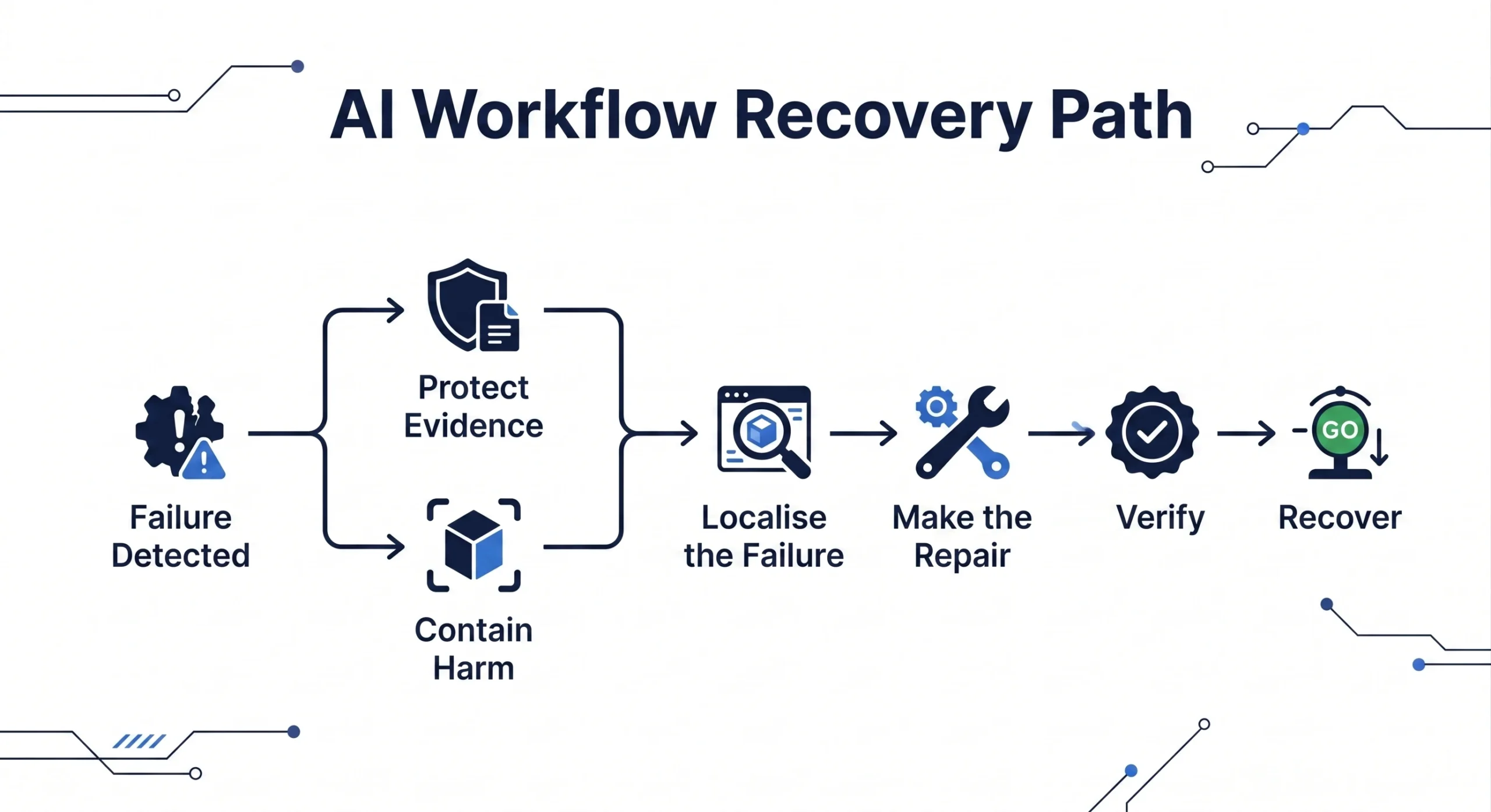
3. Protect Evidence and Contain Harm
When responding to an active workflow failure, the operator faces an immediate operational dilemma: preserving diagnostic evidence and containing operational harm.
These two actions form an unordered, parallel response pair:
- Protect Evidence: Capture raw payloads, execution logs, and configuration state before changes alter the system.
- Contain Harm: Isolate erroneous actions, reroute inputs, or add temporary review tags to limit business impact.
Neither action should be treated as universally first. Which one takes precedence depends on the urgency of the harm and the risk of losing diagnostic evidence:
- Where an automation is actively creating incorrect billing charges, sending erroneous external communications, or corrupting database records, containing operational harm takes immediate precedence.
- Where an automation is failing quietly without writing bad data, and diagnostic logs are subject to rapid expiration or deletion, capturing evidence before modifying configuration takes precedence.
Why Evidence Disappears During Recovery
Operators can destroy their ability to diagnose a problem by rushing to edit configuration settings. On documented workflow platforms, modifying a workflow’s structure can permanently alter how historical data can be re-run:
- Structural Replay Blocks: On Zapier, significant changes to the order or number of steps, or to the apps used, can prevent replaying errored steps from earlier runs. Whole-run replay may still be available, subject to Zapier’s current replay limitations. On AWS Step Functions, updating a state machine definition requires starting a new execution rather than resuming an existing one.
- Retention Clocks: Execution logs and payload histories can expire under vendor-defined, plan-, deployment-, or configuration-specific retention rules. Zapier’s history availability has current retention and display limits with Enterprise configuration differences; n8n self-hosted pruning defaults differ from n8n Cloud plan limits; and Microsoft guidance distinguishes visible run history, storage retention, and administrative or Dataverse controls. Preserve incident evidence promptly and confirm the current limit in the affected environment.
- Platform Preservation Controls: Certain platforms offer native mechanisms to protect diagnostic data. On n8n, annotating an execution exempts that specific run from automatic database pruning under default settings. If the platform provides an export or download option, preserve a copy of the relevant execution data before making changes.
The Immediate Evidence Checklist
Before modifying configuration or prompts, an operator can capture:
- The Raw Input Payload: The exact text, email body, or webhook JSON that triggered the failed run.
- The Exact AI Output: The raw string or structured JSON generated by the model before downstream parsing.
- Execution Metadata: Timestamps, execution IDs, API response headers, and status messages.
- Current Configuration State: An exported snapshot or duplicate backup of the workflow definition, including prompt text, parameter settings, model identifiers, and routing logic.
4. Localise the Failure Before Chasing Root Cause
For this guide, separate locating the failure from explaining its full cause. In an AI-assisted workflow, identifying which layer malfunctioned allows the operator to apply a targeted mitigation, provided that the identified location gives the operator an actionable control lever.
Localisation is not universally sufficient to resolve an incident—full root cause may remain unavailable, particularly when interacting with hosted foundation models or opaque external APIs. However, isolating the layer of failure prevents unguided modifications to functional components.
Use these operational layers as a practical diagnostic aid, not as an industry-standard taxonomy:
- Input and Upstream Data: Did the format, structure, or encoding of the incoming data change? Check whether an intake form added a new input field, whether an email client stripped HTML tags, or whether a webhook delivered an unexpected null value in a JSON key.
- Instructions, Rules, and Configuration: Did deterministic routing logic fail on an unhandled condition? Review branching rules immediately following the AI step. If the AI classified an intake request as
"Billing - Refund", but the routing step only has branches for"Billing - Invoice"and"Technical Support", the payload stalls due to an incomplete rule definition rather than an AI error. - The AI Behavior Layer: Did the AI model return unparseable text, generate an unlisted category, or drop required schema fields? Feed the raw input from the failed execution back into the model under identical parameters. Observe whether the model returned invalid JSON, exceeded token limits, or failed to adhere to the prompt instructions.
- Integration, Authentication, and State: Did the connection between the workflow tool and downstream software fail? Verify API connection statuses, OAuth token expirations, quota limits, and payload size thresholds. On AWS Step Functions, for example,
States.DataLimitExceededis terminal and is not caught byStates.ALL; it can be explicitly matched inErrorEqualsfor a Catch or Retry. - Downstream Action and Destination System: Did the destination system reject the update despite receiving a valid payload? Inspect destination database or CRM audit logs. Check if custom validation rules, mandatory field constraints, or duplicate record locks prevented the record from saving.
- Cross-Cutting Mechanism (Human Review): If the workflow relies on a human-in-the-loop step, did the review interface or approval queue stall? Vendor documentation on Zapier states that Needs review pauses downstream steps until review completes. In specified decline or timeout configurations, autoreplay is limited and whole-run replay may be required. An unworked or misrouted approval queue can still prevent downstream actions from progressing while earlier steps show completed statuses.
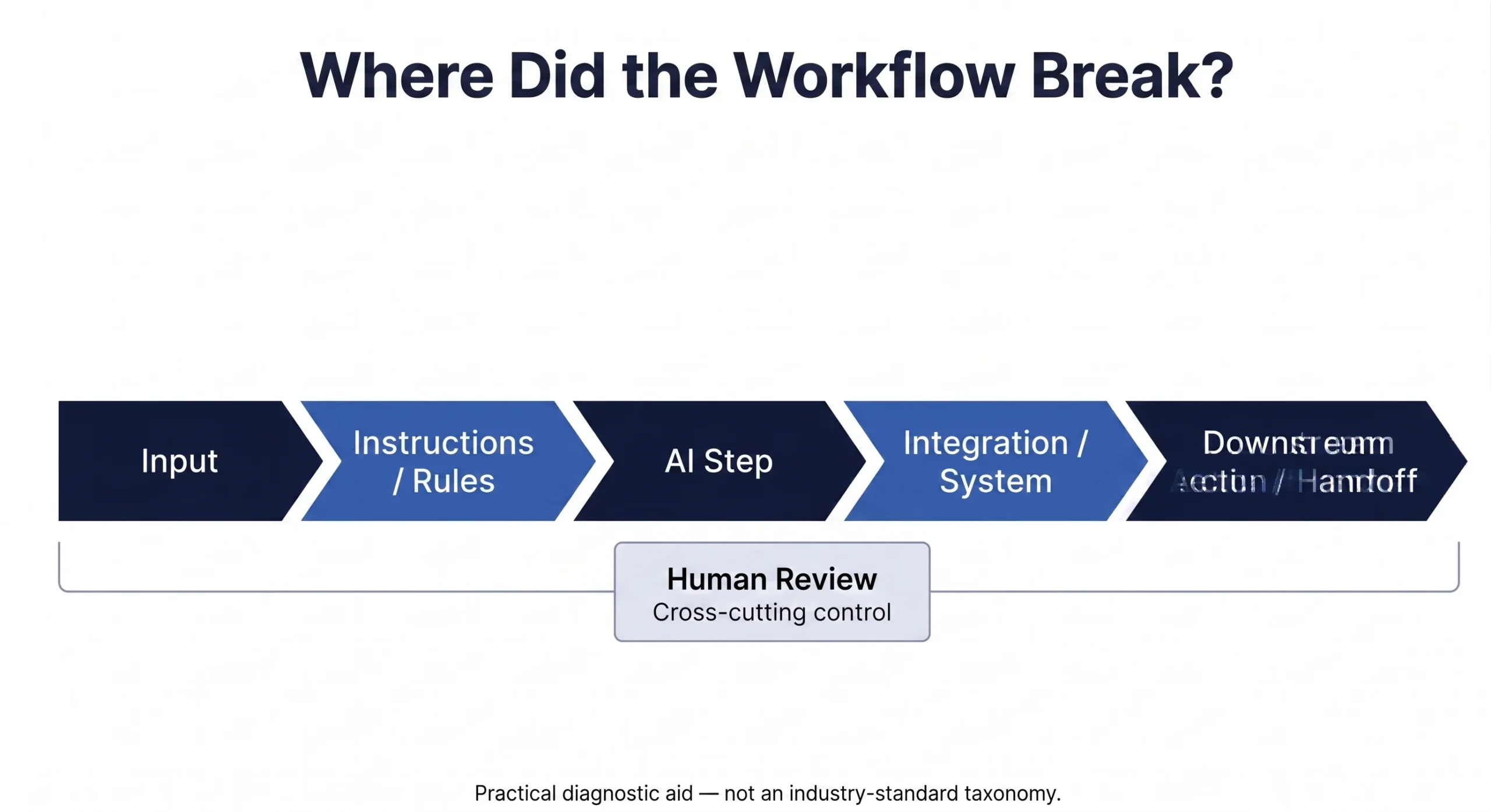
In the customer-intake example, stepping through this sequence reveals that the AI classified the inquiry (Layer 3 passed), the routing rule directed it to the CRM step (Layer 2 passed), but the CRM integration step encountered an expired OAuth token that returned an unhandled HTTP 401 error (Layer 4 failed).
Localising the failure to Layer 4 shifts the immediate investigation toward the integration layer, though multiple interacting factors remain possible.
5. Ask What Changed, but Treat It as a Hypothesis Generator
When an established workflow fails, asking “What changed?” is a useful diagnostic starting point. However, identifying a recent change generates a hypothesis; it does not constitute proof of causation.
A production workflow operates within an environment where external dependencies can shift without notice:
- The workflow platform updates its execution engine or node connectors.
- An external LLM provider may change operational behaviour behind an interface the operator cannot inspect directly.
- Downstream software modifies API validation requirements, permissions, or custom properties.
- Upstream customer submissions introduce new document structures or vocabulary.
To evaluate hypotheses systematically:
- Compare a known successful historical execution against the failed run using similar inputs.
- Isolate the specific delta in payloads, token counts, or API responses.
- Test that isolated variable independently before altering production configurations.
Last-Known-Good Comparisons and Bisection
Where clear execution logs exist from a prior stable period, comparing a known successful run against a failed run using similar inputs can highlight relevant differences in payloads, token usage, or API responses.
Operators may consider bisection—disabling or isolating specific workflow steps to determine which node introduces the failure. Bisection is conditional on possessing a clean, identifiable last-known-good baseline; where degradation takes the form of gradual quality drift rather than a clean binary break, no distinct baseline exists and bisection cannot be applied.
Furthermore, the sources reviewed here do not establish whether bisection remains formally valid when non-deterministic AI behaviour is part of the workflow. Because an LLM can produce varying outputs across runs on identical inputs, an operator cannot assume that a single successful execution through an isolated step proves that the step is functional.
6. Repair the Smallest Justified Part
After localisation, the practical objective is a targeted repair: change the smallest justified component rather than blindly rebuild the entire workflow. Treat this as a practical recovery step, not an industry-standard repair procedure.
Resist the temptation to rewrite the entire prompt, alter routing architectures, or introduce complex fallback systems during an active incident. If an SOP or workflow requires structural redesign, that work belongs in a controlled implementation phase rather than an emergency repair.
| Localised Failure Layer | Smallest Justified Repair Action |
|---|---|
| Expired CRM Authentication | Reconnect OAuth credentials and refresh access tokens. |
| Altered Inbound Payload | Adjust input data parser to handle missing keys. |
| Changed Downstream Schema | Update CRM node field mappings to include the new field. |
| AI Format Inconsistency | Add explicit output schema constraints or enable structured JSON mode. |
The Risk of Premature Error-Handling
When repairing broken steps, an operator may be tempted to add broad error handlers or configure steps to “continue on error” to force executions through.
This practice carries operational risks. Zapier currently documents automatic shutoff when a Zap has run more than 20 times in the past 7 days and 95% of those runs result in errors; account plan, grace-period, and any available error-ratio override settings can also affect deactivation behavior. A handled error or safely halted run does not automatically turn off the Zap. Repairs should correct the underlying mechanism rather than masking errors with silent handlers.
Suppressing the error signal removes the platform’s automatic circuit breaker, allowing a malfunctioning workflow to continue running while generating missing or corrupted downstream records. Repairs should correct the underlying mechanism rather than masking errors with silent handlers.
7. When Root Cause Remains Unknown
An operator can restore service through a valid workaround without uncovering the underlying root cause.
This situation can arise when working with proprietary third-party AI models or external SaaS endpoints where internal infrastructure is opaque to the user. An external provider may modify operational parameters behind a stable endpoint, leaving the operator unable to inspect the underlying cause of an output shift.
In service management, a clear distinction exists between restoring service and solving the underlying problem:
- Restoring Service (Incident Resolution): Applying a verified mitigation—such as pinning an explicit model version, refining prompt constraints, or inserting a schema validation filter—that allows the workflow to resume reliable operation.
- Solving the Problem (Root Cause Resolution): Identifying and eliminating the fundamental root cause of the failure.
If an operator restores customer intake by adding defensive validation to an AI extraction step, the immediate incident is contained. However, if the underlying reason for the model’s behavioral shift remains unconfirmed, the operator should document that uncertainty explicitly rather than assuming the problem has permanently vanished.
8. Prove the Repair Worked
Applying a repair does not confirm that service is restored; verifying that the repair functions without introducing secondary defects confirms recovery.
If an operator applies a fix and resumes full production without verification, they have no evidential basis to confirm whether the observed failure was resolved.
A useful way to verify the repair is to separate two questions: confirmation testing asks whether the failed case now works; regression testing checks whether the repair caused unintended effects elsewhere.
| Verification Discipline | Core Focus | Primary Question Answered |
|---|---|---|
| Confirmation Testing | Re-tests the specific failed cases. | “Did the fix correct the specific observed failure?” |
| Regression Testing | Tests untouched workflow paths. | “Did the repair introduce unintended side effects elsewhere?” |
- Confirmation Testing (Re-testing the Failed Cases): The operator runs the exact historical inputs that failed during the incident through the repaired workflow to establish whether the specific failure condition is resolved.
- Regression Testing (Checking Untouched Paths): The operator tests standard, routine inputs that previously succeeded to check whether the repair introduced unintended side effects into other workflow paths.
These two activities address different questions. Confirmation testing checks the repaired failure point; regression testing checks surrounding paths.
The Verification Void in AI Output Correctness
In deterministic software testing, a test passes or fails against an exact return value or database state. For AI-assisted workflows, define validation evidence for the intended outcome; a successful execution alone does not prove semantic output correctness after a repair.
Because LLMs exhibit non-deterministic behavior, observing a single correct output on a test input does not establish that the prompt will perform consistently across subsequent runs.
To gain practical confidence when evaluating an AI component, this guide suggests several operational techniques:
- Re-run identical test inputs several times to observe output variance.
- Test across edge cases, unusual formatting, and typical inputs.
- Inspect the actual downstream records directly in the target application, rather than relying solely on the workflow tool’s execution log.
These techniques provide practical operational checks; they do not constitute an externally validated mathematical guarantee. Furthermore, if the operator did not preserve the original failing inputs during the incident, meaningful confirmation testing against the exact failure condition is impossible.
9. Reconcile What the Broken Workflow Already Did
A workflow that executes cleanly going forward is not fully recovered if its earlier failure left corrupted, duplicated, or missing records in downstream systems.
Fixing an automation forward does not undo actions it already took backward. Do not assume that replaying a workflow action is automatically idempotent (the property where executing an operation multiple times produces the same result as executing it once). Reconcile affected downstream actions before replaying them, because retry behavior and side effects depend on the workflow and destination system.
If an automation partially executed a multi-step sequence before failing, re-running historical executions can create duplicate charges, send repeat notifications, or overwrite updated customer records with stale data:
- Missing Records: Inbound transactions dropped or unhandled during the failure window.
- Duplicate Records: Duplicate records or tasks created by uncoordinated retry attempts.
- Corrupted Records: Partial database writes or mismatched field values created before the failure was contained.
Before considering recovery complete, the operator must address historical data integrity across the failure window:
- Identify Missing Records: Query upstream inboxes or webhook logs to identify transactions that arrived during the failure window and never completed downstream actions.
- Identify Corrupted Writes: Inspect destination CRM or database entries created during the malfunction to locate records with missing fields, invalid tags, or unassigned owners.
- Check for Duplicate Actions: Verify whether automated retries or manual interventions generated duplicate records or tasks.
- Identify Stakeholder Follow-ups: Compile a list of specific customers or internal users whose requests stalled, and assign direct follow-up tasks to the team.
The obligation to reconcile downstream state is a necessary element of workflow recovery. While the specific backfill or correction method depends on the architecture of the tools in use, recovery remains incomplete until historical data is verified.
10. Decide How the Workflow Returns
At the return decision point, consider both the evidence that the repair works and the reconciliation state of affected downstream actions. Use three practical return postures: return normally, return narrowly, or rebuild the scope. These are decision options for organising recovery, not an industry incident standard:
- Return Normally: Verified recovery, acceptable remaining uncertainty, and reconciled downstream effects.
- Return Narrowly: Intermittent issue, unconfirmed root cause, mitigated operational risk.
- Rebuild Scope: Architectural failure, invalid business process mapping.
Posture 1: Return Normally
A normal return can be appropriate when the observed failure no longer reproduces under the available checks, surrounding workflow paths remain sound, downstream effects have been reconciled, and any remaining uncertainty is explicitly documented.
Posture 2: Return Narrowly
The workflow is returned to service under restricted operational boundaries. This posture is appropriate when the repair relies on a workaround, the failure was intermittent, or the operator cannot fully verify edge-case behavior across high volumes.
Tactics for a narrow return include:
- Routing to a Staging Environment: Directing output to a draft folder, sandbox database, or staging queue before writing to production records.
- Inserting an Interim Review Gate: Temporarily route affected actions through manual approval while confidence remains incomplete.
- Restricting Input Scope: Re-enabling the workflow for a single department, a specific customer segment, or an internal test channel before opening it to general inbound traffic.
Posture 3: Rebuild Scope
If troubleshooting reveals that the workflow failed because the underlying business process changed, edge-case complexity overwhelmed the prompt structure, or the automation lacks necessary review gates, patching the workflow is insufficient.
The operator should maintain manual processing and initiate structured process remapping and rebuild, followed by readiness assessment and controlled implementation.
Once a workflow returns to live service, it should re-enter post-deployment AI monitoring so operators can determine whether the restored workflow remains acceptable under real operating conditions. Where the repair changed the production configuration, evaluating the resulting production change determines whether prior evidence and authorization still apply.
11. Close the Incident Honestly
Closing an incident responsibly requires documenting what was observed, what was repaired, and what operational uncertainties remain.
A workflow running without active errors is not proof that the underlying problem has been eliminated. This distinction is especially critical when dealing with intermittent AI malfunctions.
When the malfunction is intermittent, an error-free period cannot distinguish a problem that is fixed from one that is simply not currently firing due to temporary input conditions. No finite monitoring duration can provide logical certainty regarding intermittent faults.
Incident Closure Summary Template
- Observed Failure Symptom: (e.g., CRM records dropped despite green execution logs)
- Localised Failure Point: (e.g., Layer 4 – OAuth credential expiration)
- Action Taken: (e.g., Reconnected CRM integration and refreshed access tokens)
- Evidence Preserved: (e.g., Exported failed JSON execution payloads)
- Validation Conducted: (e.g., Confirmation testing against failed payloads and regression checks on standard inquiries)
- Reconciliation Status: (e.g., Dropped CRM records identified and backfilled manually)
- Return Posture Selected: (e.g., Normal return with initial operator oversight)
- Known Residual Risks: (e.g., External API token refresh behavior requires observation)
A complete incident closure record should document:
- The Observed Symptom: The initial business failure and its operational impact.
- The Localised Point of Failure: The specific layer where the breakdown occurred.
- The Corrective Action: The exact change, credential refresh, or prompt adjustment applied.
- Validation Evidence: The confirmation and regression tests conducted prior to restoration.
- Reconciliation Summary: The scope of historical records backfilled, corrected, or reviewed.
- Residual Uncertainty: Any unconfirmed root causes or external dependencies that may recur.
Documenting these factors provides the operational foundation required to support future troubleshooting, preserving institutional knowledge and ensuring the team manages its AI workflows with technical credibility and control.