Imagine a small team using AI to draft monthly client updates. The generated draft looks mostly correct, but the team faces a recurring bottleneck: nobody knows exactly what background information was entered, what tone guidelines were followed, who is responsible for catching mistakes, or how the final text should be verified before it goes out. Each run is a guessing game.
A controlled AI workflow is a repeatable way to run AI-assisted work with structured inputs, operating rules, human review gates, and output or evidence checks.
It defines what information the workflow may use, how it may operate, where people review consequential work, and how the result is checked before use. This guide connects those controls across the workflow lifecycle, from process mapping and readiness through testing, monitoring, troubleshooting, and authorized change.
The same control model can support internal business processes and applied e-commerce workflows. The e-commerce guidance on this site uses the same underlying controls rather than a separate parent framework.
In This Article
This guide covers the core parts of a controlled AI workflow and how small teams can use them to make AI-assisted work easier to review and repeat.
The Controlled AI Workflow Lifecycle
- Map the Process: Document the current process, decisions, handoffs, exceptions, and evidence in Business Process Mapping for AI Automation.
- Assess Readiness: Use the AI process readiness assessment to determine whether the mapped process is suitable to build.
- Convert the SOP: Translate approved instructions into executable steps with SOP Automation with AI.
- Design Controls: Define the inputs, rules, review gates, evidence checks, and exception route described on this page before operating the workflow.
- Test the Workflow: Set release conditions and test the complete workflow with AI workflow testing.
- Monitor Production: Review live evidence, drift, and operating performance through post-deployment AI monitoring.
- Troubleshoot and Reconcile: Investigate failures and restore the approved operating basis with AI workflow troubleshooting.
- Change Under Authorization: Evaluate and approve production modifications through managing production AI workflow changes.
Applied E-commerce Implementation
For practical store use cases, see AI workflows for e-commerce. It applies the same controlled-workflow elements to product content, marketing, customer support, review analysis, data cleanup, reporting, and social content.
- Why one-off prompts fail in real workflows
- Controlled workflows vs. ad-hoc prompting
- The four parts of a controlled workflow
- Three examples of controlled workflows
- Common pitfalls in small team AI adoption
- When a controlled workflow is worth building
- Frequently asked questions
Why One-Off Prompts Fail in Real Workflows
Relying on ad-hoc prompting or individual prompt tricks is difficult to sustain. Without a controlled prompt workflow, teams run into several practical problems:
Inconsistent Output Style
Without structure, the AI response varies with each run. One day a draft is helpful and concise; the next, it is verbose or misaligned with client preferences. This inconsistency leads to unnecessary editing and slows down delivery.
Unpredictable Results
Model updates or minor changes in prompt phrasing can produce completely different results. Teams spend valuable time troubleshooting prompts or fixing unexpected variations rather than completing their primary work.
No Clear Audit Trail
When there is no standard process for generating or checking AI work, it is impossible to trace where a factual error or styling issue originated. This makes quality assurance difficult for managers and operators.
Wasted Time on Rework
Instead of saving time, team members spend their day correcting AI outputs, copy-pasting text back and forth, and trying to fix bad drafts. The lack of guardrails turns what should be a shortcut into a chore.
Controlled Workflows vs. Ad-Hoc Prompting
Moving from unstructured prompts to a controlled AI workflow changes how your team handles daily tasks. Here is the difference between the two approaches:
| Operational Area | Ad-Hoc Prompting | Controlled AI Workflow |
|---|---|---|
| Input Standard | Variable or incomplete instructions based on memory. | Structured prompt inputs using standardized templates. |
| Operating Rules | Vague rules that rely on the model to “guess” the context. | Explicit guidelines for tone, length, and formatting. |
| Human Oversight | Optional or random checks after the work is done. | Human review gates at key risk points in the process. |
| Output Quality | Highly variable drafts requiring extensive manual edits. | More consistent outputs with less avoidable rework. |
| Repeatability | Hard to pass to other team members. | A repeatable workflow that anyone on the team can run. |
The Four Parts of a Controlled Workflow
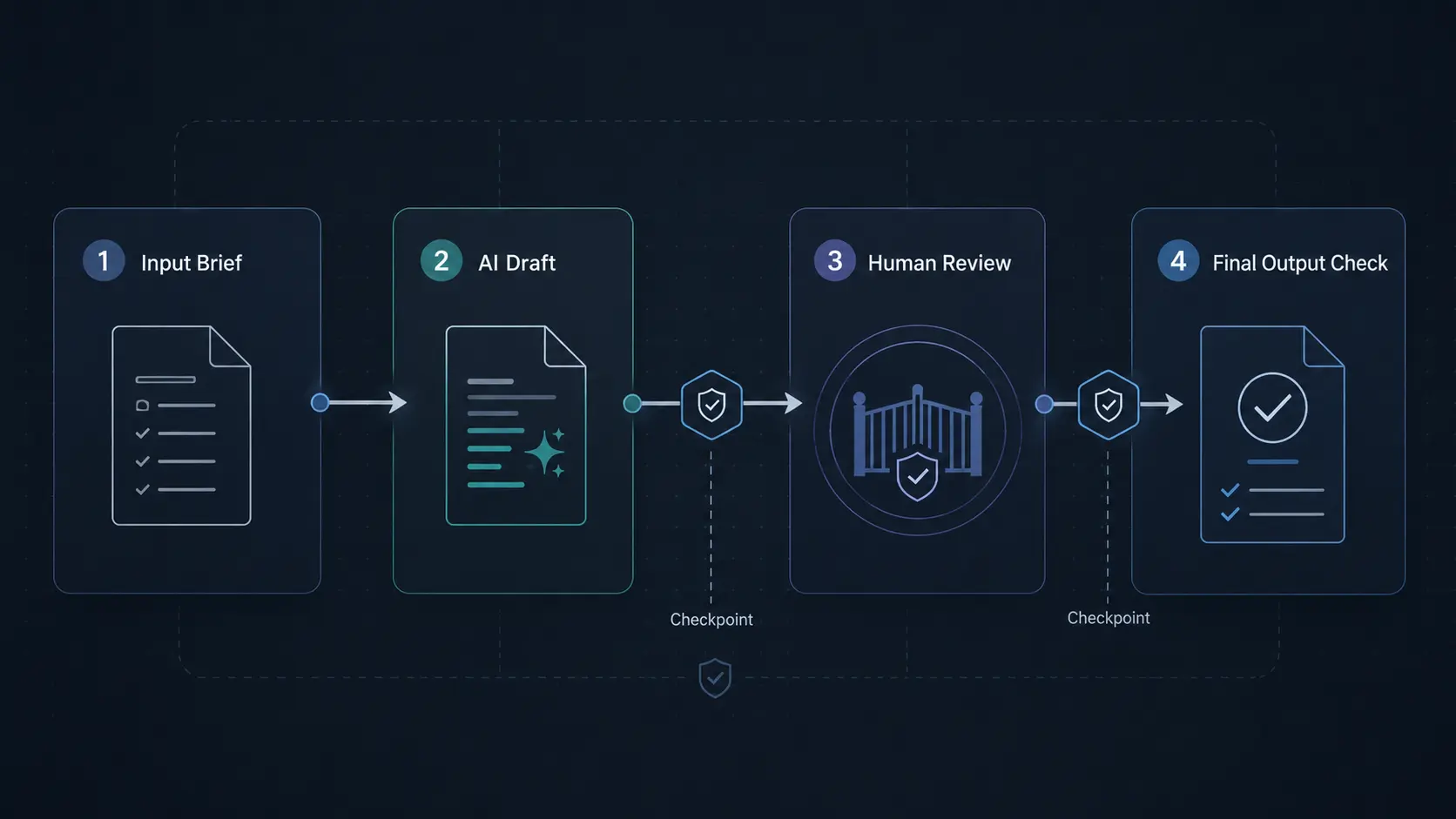
Most controlled business AI workflows need four distinct components. These parts work together to ensure that the AI operates within safe, predictable limits.
1. Structured Inputs
Structured inputs define exactly what information the AI receives before it starts working. Instead of asking the AI to write a document from scratch, you provide a clear template with variables. This might include the target reader, the main goals, approved source data, and writing style references. When inputs are structured, the AI does not have to guess the context.
2. Defined Operating Rules
Rules set the boundaries for how the AI behaves. These are explicit instructions and constraints that you build into the system. For example, you might instruct the AI to limit its response to 300 words, write in a direct style, avoid specific corporate jargon, or use a specific layout. These rules keep the output aligned with your standard practices.
3. Human Review Gates
Review gates are designated checkpoints where team members inspect the AI’s work before it moves forward. The goal is to keep humans in control of critical decisions. A review gate might involve validating factual accuracy, checking tone alignment, or confirming that the output meets safety standards. This human-in-the-loop setup ensures accountability.
4. Output Checks
Output checks are the final validation steps before the result is used or sent to a client. These can be automated, manual, or a mix of both. An output check verifies that the final draft meets formatting requirements, contains no placeholder text, and matches the original source data. This step prevents avoidable errors from slipping through.
Workflow Control Record
- Workflow Objective: the approved result the workflow is meant to produce.
- Approved Inputs / Source Data: the information and sources the workflow may use.
- Decision / Operating Rules: the instructions, constraints, and routing logic that apply.
- Prohibited / Consequential Actions: actions the workflow must not take or must route for approval.
- Human Review Gate Owner: the person or role accountable for the review decision.
- Output / Evidence Check: the validation required before use and the evidence retained.
- Exception / Escalation Route: where work goes when it falls outside approved rules.
Three Examples of Controlled Workflows
Controlled workflows can be adapted to fit different operational areas in a small business or agency environment.
Content Creation Workflow
- Inputs: A standardized outline brief containing target audience profile, primary search terms, and approved source reference materials.
- Rules: Strict guidelines to write in a direct voice, structure the content using H2 and H3 subheadings, and omit filler phrasing.
- Review Gate: An editor reviews the initial draft to verify the logical flow, check style alignment, and ensure all references are accurate.
- Output Check: A final run through a grammar check and a format verification before uploading to the content manager.
Support Ticket Triage Workflow
- Inputs: The raw text of a customer support request combined with basic client history from the database.
- Rules: Logic instructions telling the AI to categorize the ticket by department and suggest an initial template response.
- Review Gate: A support agent reviews the category and the draft response, makes necessary corrections, and clicks send.
- Output Check: An automated check to confirm that no template placeholders or generic variables are present in the final message.
SOP Document Generation Workflow
- Inputs: Raw notes or a transcript from a team member explaining a repeated internal task.
- Rules: Guidelines to structure the output as step-by-step instructions, use action-oriented verbs, and include clear warnings for risk points.
- Review Gate: The team lead reviews the drafted SOP to confirm that the steps are correct and align with company policy.
- Output Check: A compliance checklist verifies that all required warnings or disclaimers are formatted and positioned correctly in the final document.
Common Pitfalls in Small Team AI Adoption
When teams attempt to adopt AI tools, they often fall into a few common process traps that controlled workflows are designed to avoid:
- Assuming AI can run on auto-pilot: Removing human review gates completely is a significant risk. Without human oversight, small errors can escalate into client communication issues or operational mistakes.
- Relying on tribal prompt knowledge: If only one team member knows the “perfect prompt,” the process is fragile. Repeatable workflows ensure that any team member can generate consistent results.
- Neglecting output verification: Assuming that the AI’s output is factually correct without a final validation step leads to quality slip-ups over time.
- Over-complicating the setup: Good workflow design should simplify your day-to-day operations. If a workflow requires too many tools or complex steps, the team will bypass it.
A Practical Rule for Controlled AI Workflows
If your team cannot explain how an AI output was created, it is not ready to be used in a repeatable business process. A useful AI workflow should make the work easier to inspect, not harder to question.
This is why Pro Prompt Flow treats prompts as only one part of the system. The real control comes from the full workflow: the input standard, the operating rules, the review gate, and the final output check.
For more practical breakdowns on structured AI systems, review the latest AI workflow insights from Pro Prompt Flow.
When is a Controlled Workflow Worth Building?
You do not need a controlled workflow for every one-off task. However, building a structured system is highly valuable when:
- Your team performs the same AI-assisted task repeatedly every week or month.
- The output goes directly to clients or impacts your brand reputation.
- Multiple team members need to run the same process and achieve consistent style.
- You need a clear record of what inputs and rules were used for quality control.
- You are an agency or service provider producing similar deliverables for multiple clients and need a consistent process your team can repeat.
Designing Repeatable Workflows with Pro Prompt Flow
Pro Prompt Flow focuses on helping small teams and B2B operators design and build practical workflow systems. We focus on mapping your existing processes, defining clear rules, and establishing simple review gates so your team can use AI with confidence. Our specialized AI workflow services help you turn experimental prompting into repeatable workflows that fit your daily operations.
Final Takeaway: Transitioning to Controlled Execution
Moving from unstructured prompts to a controlled AI workflow is how you shift from experimental tool usage to controlled execution. By defining structured inputs, clear rules, practical review gates, and final output checks, your team can produce work that is more consistent and easier to review. This structured approach helps small teams reduce operational confusion and get predictable results from their AI systems.
Once a controlled workflow is authorized and running in production, those controls also become part of the evidence used in post-deployment AI monitoring to determine whether the workflow remains acceptable to operate.
Frequently Asked Questions About Controlled AI Workflows
What is the difference between random prompting and a controlled AI workflow?
Random prompting is an ad-hoc process that relies on individual memory and repeated trial and error. A controlled AI workflow is a structured process that standardizes inputs, defines rules, adds human review gates, and checks outputs before use.
Why do small teams need human review gates in their workflows?
Small teams need review gates because AI outputs can look polished while still containing factual, tone, formatting, or process errors. Review gates define where a person must approve, reject, or revise the output before it moves forward.
How do structured inputs help reduce AI errors?
Structured inputs reduce ambiguity. They give the AI the required context, source material, audience, rules, and expected format before it starts working. This makes the output easier to review and less dependent on guesswork.
What are examples of rules in a controlled AI workflow?
Rules can include word limits, tone guidelines, formatting requirements, forbidden phrases, required source material, escalation rules, approval steps, and instructions for what the AI should avoid doing.
Can controlled workflows be automated without losing human oversight?
Yes, but automation should not remove accountability. Inputs, formatting, routing, and checks can be automated, while human review gates remain in place for decisions that affect clients, customers, policy, or brand reputation.
Map Your Process to a Controlled Workflow
If your team already uses AI for a repeated task, Pro Prompt Flow can help you map the process into clear inputs, rules, review gates, and output checks.
Request a Free AI Workflow Audit to review where your current AI workflow needs more control.
Pingback: AI Workflow Testing: Validate Before Production
Pingback: AI Workflows for E-commerce: 7 Automations for Small Stores
Pingback: AI Prompts for E-commerce Marketing: Ads, Emails & Social Copy
Pingback: Scheduled AI Tasks: What to Check Before You Rely on Them